Art Print Sizes: Standard Dimensions & Ratios
October 27,2026 2:11 AM(UTC+8) 123 views
A design that looks perfect on your monitor can fall apart on paper. Print it too small and the fine details vanish. Enlarge it without preparing the file and you get blurry edges and visible pixels. Choosing the right print size is the first step in avoiding both.
Whether you make digital illustrations, anime fan art, photography, paintings, or merch designs, knowing your sizes helps you pick paper, set prices, and offer customers options that actually fit their walls.
This guide covers standard print dimensions, aspect ratios, print resolution, and practical tips for getting your files ready to print.
What Are Standard Art Print Sizes?
Standard sizes are the dimensions that printers, framers, and shops use most, which makes artwork easier to print, frame, display, and sell. What's available depends on your printer, the paper format, and the market you're selling to.
Most artists offer several sizes of the same design so buyers can match a print to their space and budget. Before you decide which sizes to offer, it helps to know the common measurements.
Common Art Print Dimensions
Prints are measured in inches or centimeters. The sizes below are common, not a complete list, and your printer or print-on-demand provider may offer a different range.
If you're just starting out, three or four sizes is plenty. Resist the urge to list every option. You can add more once you see which ones people actually buy.
A sensible starter set for a 2:3 illustration is 8 x 12, 12 x 18, and 24 x 36 inches. That's three sizes in one ratio, so the same crop works for all of them.
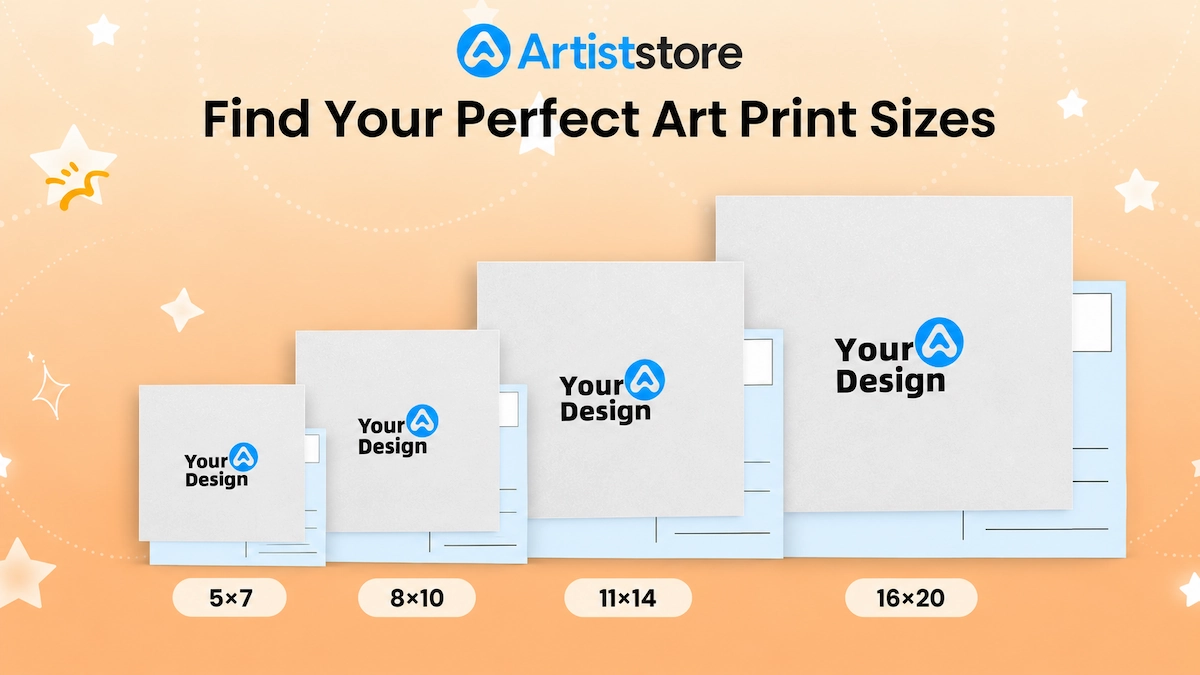
These dimensions cover most posters, illustrations, photographs, and decorative prints:
|
Print size |
Dimensions in centimeters |
Common uses |
|
4 x 6 inches |
10.2 x 15.2 cm |
Small prints, postcards, and photographs |
|
5 x 7 inches |
12.7 x 17.8 cm |
Gift prints and small illustrations |
|
8 x 10 inches |
20.3 x 25.4 cm |
Small wall art and framed illustrations |
|
8 x 12 inches |
20.3 x 30.5 cm |
Portraits, photography, and illustrations |
|
11 x 14 inches |
27.9 x 35.6 cm |
Medium-sized wall art |
|
12 x 16 inches |
30.5 x 40.6 cm |
Decorative prints and character artwork |
|
12 x 18 inches |
30.5 x 45.7 cm |
Posters and larger illustrations |
|
16 x 20 inches |
40.6 x 50.8 cm |
Statement artwork and wall displays |
|
18 x 24 inches |
45.7 x 61 cm |
Posters and large wall art |
|
24 x 36 inches |
61 x 91.4 cm |
Large posters and display prints |
International Paper Sizes: A4, A3 and A2
If you're selling to customers in countries that use ISO paper sizes, the A-series is worth knowing. Every size in the series shares the same proportions, so you can scale an A2 design down to A3 or A4 without cropping or distorting it.
An A4 print and an 8 x 10-inch print aren't the same size, though. A4 is taller and narrower. If customers plan to use ready-made frames, make sure your dimensions match the frames they're likely to buy.
|
Paper size |
Dimensions in millimeters |
Dimensions in inches (approx.) |
|
A5 |
148 x 210 mm |
5.8 x 8.3 in |
|
A4 |
210 x 297 mm |
8.3 x 11.7 in |
|
A3 |
297 x 420 mm |
11.7 x 16.5 in |
|
A2 |
420 x 594 mm |
16.5 x 23.4 in |
|
A1 |
594 x 841 mm |
23.4 x 33.1 in |
What Is an Art Print Aspect Ratio?
An aspect ratio describes how a print's width relates to its height. It's written as two numbers, such as 2:3, 3:4, or 4:5. A 12 x 18-inch print is 2:3, because both measurements divide by six to leave 2 and 3.
Ratio matters because changing a print's size without respecting its proportions stretches, squashes, or crops the artwork. Say you've drawn a full-body character in a 2:3 portrait. Print it at 8 x 10 inches, which is 4:5, and the format is shorter than your composition. Scaled to fit the width, your figure is 12 inches tall on a 10-inch sheet, so either about two inches get cropped or the character is squeezed to fit. Checking ratios before you send a file to print avoids that.
● 2:3 is a popular portrait format for posters, character illustrations, and photography. Common sizes include 4 x 6, 8 x 12, 12 x 18, and 24 x 36 inches.
● 3:4 works well for portraits, digital illustration, and decorative artwork. Examples are 9 x 12, 12 x 16, and 18 x 24 inches.
● 4:5 is common for portraits and framed art, and it suits compositions built around a more compact rectangle. Typical sizes are 8 x 10 and 16 x 20 inches.
● 1:1 gives you a square, with equal width and height. Squares suit characters, portraits, abstract work, and album-style designs. Think 8 x 8 and 12 x 12 inches.
● The ISO A-series uses a ratio of about 1:1.414, which is handy when one file needs to cover several A-series sizes without changing proportions.
There's no single best aspect ratio. The right one depends on your composition, the size you're printing, and how customers are likely to display the piece.
How to Choose the Right Art Print Size
The size you pick should suit both the artwork and what it's for. A small, detailed illustration might look great as a compact print, while a landscape full of important details may need more room.
Consider Where the Print Will Be Displayed
Think about the space where someone might hang your work. Small prints suit desks, shelves, and gallery walls. Medium prints sit well above a desk, beside a bed, or in a small living area. Large prints belong on bigger walls, where the artwork is meant to be the focal point. Offering a range lets customers choose for the space they actually have.
Check the Details
Detailed illustrations often benefit from larger sizes, because viewers can see more of the fine lines, textures, and small elements.
Bigger doesn't automatically mean better, though. The original file has to contain enough image data to hold all that detail at the larger size. Stretch a small image across a big sheet and you'll get soft edges and visible pixels.
Think About the Frame Size
Frame compatibility matters, especially for customers who want to hang their purchase right away. An 8 x 10-inch print fits an 8 x 10 frame, although the visible artwork gets smaller if the frame includes a mat. Many ready-made frames in the US come in sizes like 8 x 10, 11 x 14, 16 x 20, and 24 x 36, so sticking to common dimensions saves customers a trip to a custom framer.
If you offer unusual dimensions, customers may need custom frames. That isn't a dealbreaker, but put the exact measurements on the product page. Also separate the artwork's dimensions from the outer dimensions of a framed product, since the two numbers aren't the same.
Consider Printing and Shipping Costs
Larger prints use more paper, cost more to produce and ship, and may need different packaging. Before you settle on your sizes, check your printer's or fulfillment provider's pricing and work out your costs for each option. A bigger print doesn't automatically earn a bigger profit.
Your final price should cover production, packaging, shipping, platform fees where they apply, and the margin you want to keep.
Matching Print Size to File Size
Print size and pixel dimensions are directly linked. At 300 PPI, a common target for art prints, you multiply each print dimension in inches by 300 to find the pixels you need. An 8 x 10-inch print needs about 2400 x 3000 pixels. A 12 x 18 needs 3600 x 5400. A 24 x 36 needs 7200 x 10800.
Those numbers explain why a small image can't simply be stretched to poster size. A 2400 x 3600-pixel file printed at 24 x 36 inches works out to just 100 PPI, and it will look soft.
If you think you might sell large prints someday, start with a big canvas. You can always scale a file down. You can't add real detail back later.
Most design programs let you check this before you export. Set your canvas to your largest planned print size at 300 PPI and work from there, or take the pixel dimensions of a finished file and divide by the print size in inches to see what resolution you'll actually get.
Preparing Artwork for Printing
Choosing dimensions is only half the job. The file itself also has to be set up properly so the printed result matches what you saw on screen.
● Resolution decides how much detail survives printing. For many art prints, 300 PPI is a sensible target, though the right number depends on your printer, the artwork, and how far away viewers will stand.
● File format depends on the artwork and the printer's requirements. PNG suits digital illustration, clean edges, and transparent backgrounds, while JPEG suits photographs and flattened images.
● Color will shift between screen and paper. Screens emit light, while prints rely on ink or toner sitting on a physical surface, so order a proof copy when you can.
● Paper changes how color and detail read. Matte paper cuts glare and suits most illustration, while glossy makes colors pop but shows fingerprints. Ask for a sample if your printer offers one.
● Bleed is extra artwork that extends past the final trim edge, so a slightly off-center cut doesn't leave a white border. Safe margins do the opposite and keep important elements away from the trim line.
Selling Prints Without Managing Production
Once your sizes, ratios, and files are sorted, the next question is where to sell. A print-on-demand platform like Artiststore lets you upload your artwork, choose from the sizes on offer, and leave printing and shipping to the platform. You'll still want to check each product's dimensions and file requirements first, which is exactly what the sections above prepare you for.
Before You Hit Upload
List the width and height of every size you offer, name the measurement unit, and say whether a frame is included. Those three details on a product page head off most of the “is this the right size?” messages. Keep the format identical across every product page so customers can compare sizes at a glance.
Start with the proportions of your original artwork, pick the sizes that suit it, and expand from there as your customers tell you what they want.